PILLOW SHOPPING, MADE PERSONAL.

Find your pillow. Start with your fit.

You know how you sleep. Your next pillow should fit the picture. Pillow Pair turns your measurements, mattress feel, and sleep habits into a clear support profile and a shortlist of real pillow options.

  • Free to use
  • No account required
  • English + Español

Version 1.3.5 · Android 7.0 or later · 58 MB

Prefer a direct download? Get the official APK →
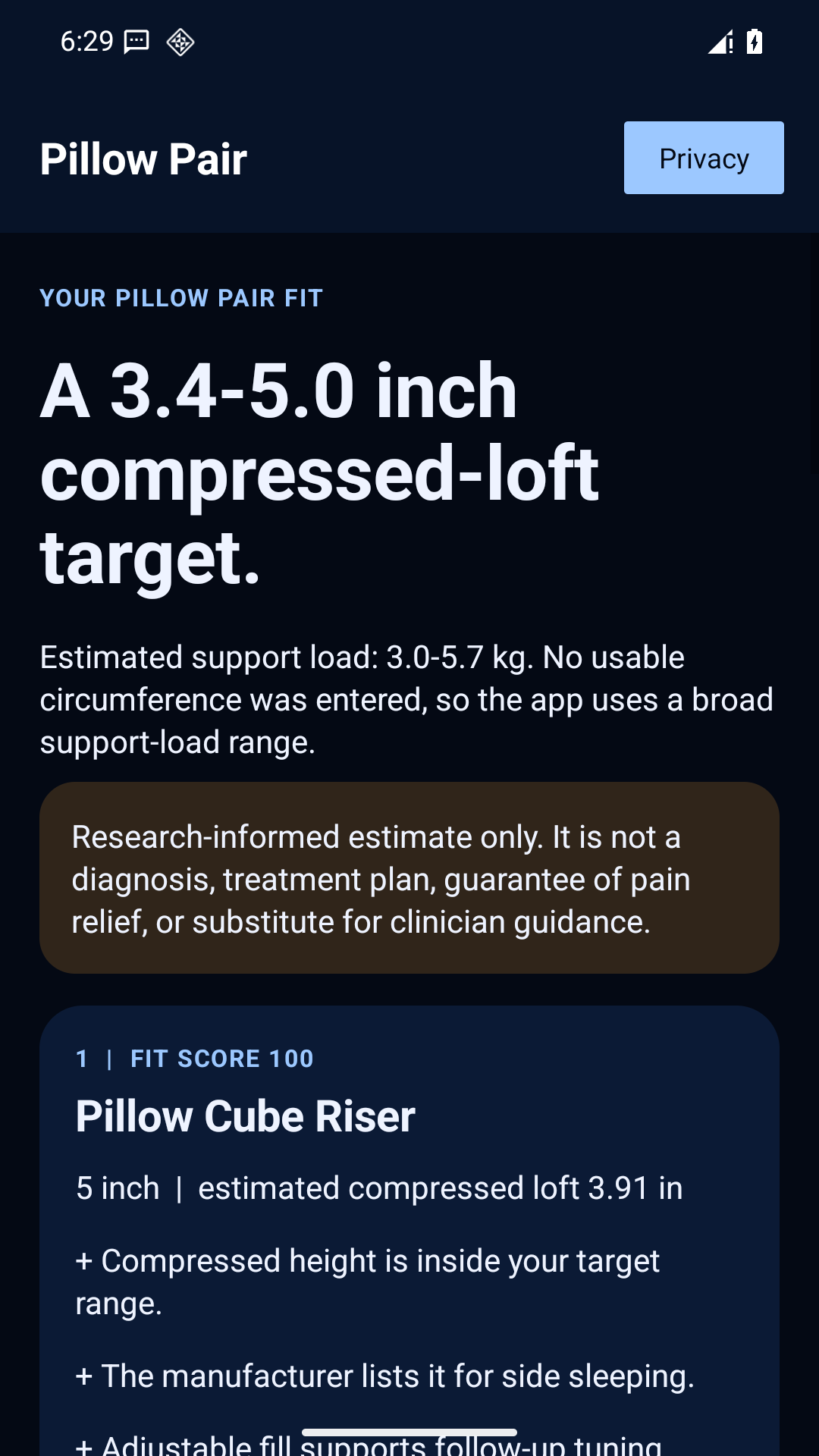
Pillow Pair example result showing a compressed-height range and reasons for a named pillow match
A clearer starting point. Example app screen. Your result will depend on your answers.

A height range you can use

Named pillows you can compare

Reasons you can understand

MAKE THE NEXT CHOICE COUNT

Too many pillows. Too little guidance.

Another pillow arrives. It looks comfortable, the description sounds convincing, and the reviews are enthusiastic. Yet you still have the same question when you put it on your bed: does this actually suit me? Shopping by a label such as soft, firm, or orthopedic leaves a lot for you to work out.

Pillow Pair gives that decision a structure. Start with your own measurements and the way you use your bed. See an estimated compressed-height range, understand the support factors behind it, and compare specific pillow variants against that profile. You get a more useful question to ask than whether a pillow is popular: how does this option line up with my needs?

Keep the result handy while you compare products, discuss options, or revisit a pillow you already own. The aim is a more informed starting point and a practical way to refine your choice over time.

WHAT YOU GET

Less second-guessing. More useful detail.

01

Put a range around “the right height.”

Pillow height on a shelf is only part of the story. The app estimates compressed loft: the height a pillow may provide under load. Your result gives you a range to compare against product options, with firmness and support information alongside it. That makes a broad phrase like medium support easier to translate into something you can actually evaluate.

02

Compare an actual model and size.

A brand name alone does not tell you which version belongs on your shortlist. Pillow Pair compares named variants from its starter catalog and explains the relevant fit factors. Look at height, firmness, sleep-position compatibility, and adjustability together. When two options look similar, the reasons help you understand what separates them and what you should check before ordering.

03

Keep learning after the first night.

A recommendation is more useful when you can return to it. Save your fit, record how the setup feels, and use the 7- and 14-night follow-ups to organize your observations. You have a place to note what changed and consider a practical adjustment. The result becomes a reference you can use, rather than a quiz answer you forget.

FROM QUESTIONS TO COMPARISON

Four steps to a more personal fit.

A guided assessment, in the language and units you prefer. Move through it at your own pace.

  1. Start with you

    Enter your height, choose US or metric units, and add optional measurements when you have them. You do not need special equipment or a wearable. Clear labels help you understand what each answer contributes. Missing optional information can widen an estimate, so you can begin with what you know and return with more detail later.

  2. Describe a real night

    Tell Pillow Pair whether you sleep on your side, back, stomach, or a combination. Add your mattress feel and comfort preferences, including whether you tend to sleep hot. These details give the recommendation context. You are describing your own bed and habits, so the shortlist can reflect more than a single preferred sleeping position.

  3. Choose your level of detail

    Include relevant restrictions, then choose whether to add guided photos. Photos are optional; you can continue with the questionnaire. If you use them, follow the framing guidance and include your full body in front and side views. The app checks whether the images are usable and asks for a retake when important landmarks are missing.

  4. Leave with a useful shortlist

    Review your estimated support range and the named pillow variants that fit it. Read the reasons, consider the tradeoffs, and save the result for later. You can take that information into your shopping process, check the current manufacturer details, and decide which option deserves a closer look. Your next step is a considered comparison.

Start with what you know. Add detail as you go.

Build my fit profile →
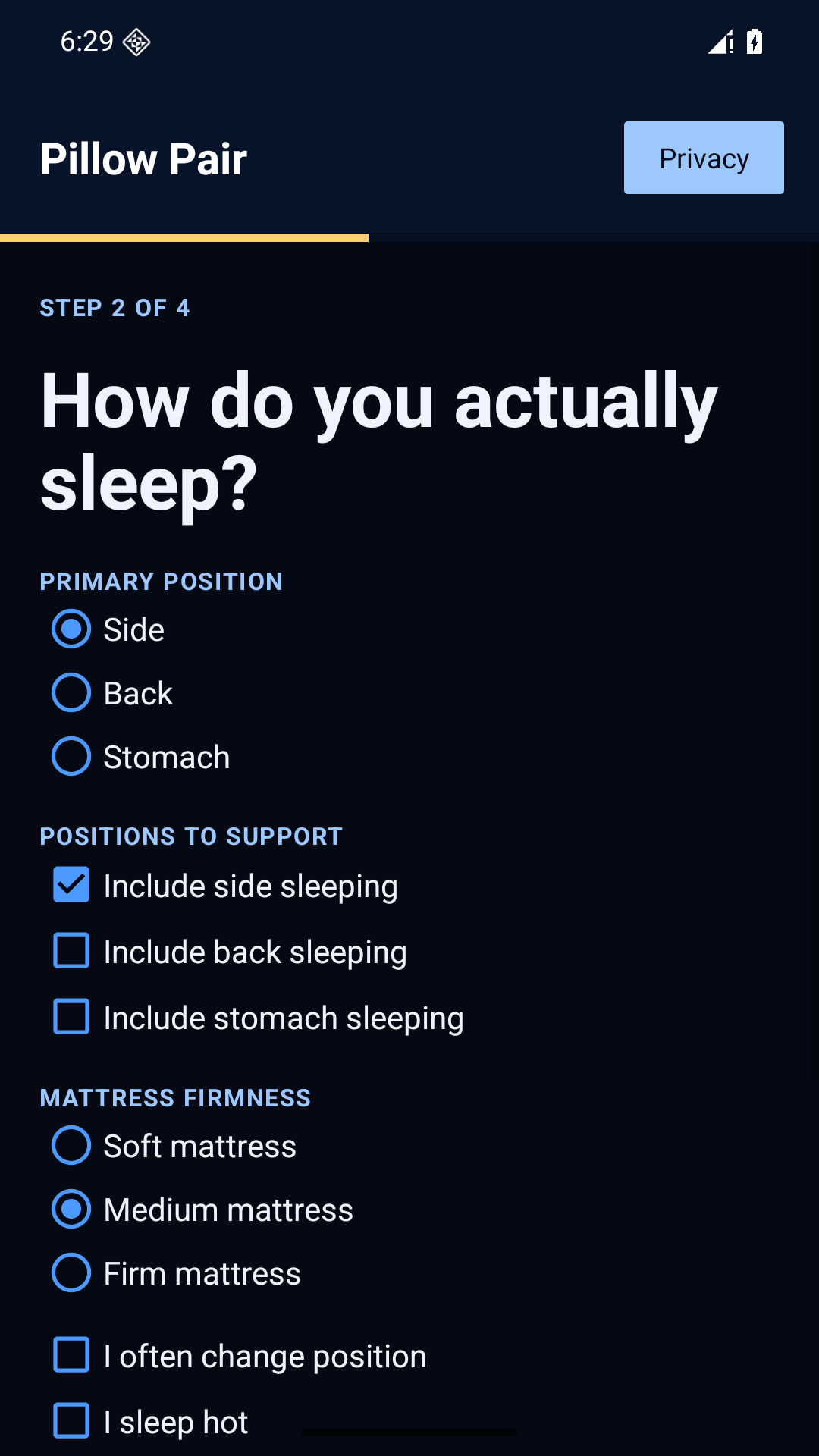
Android sleep-preference screen with position and mattress choices
Your habits give the estimate context.

YOUR BED. YOUR HABITS.

A pillow does not work on its own.

The same pillow can feel different in a different setup. Pillow Pair asks about mattress firmness because the estimate considers how much support your bed already provides. It also distinguishes your primary sleeping position from the other positions you regularly use. That combination helps turn a general preference into a more specific comparison.

See the reasoning beside the recommendation.

A fit score is a starting point for reading, not a substitute for it. Each match brings its explanation with it, so you can see where the product aligns with your target and where compromises remain. Adjustable fill, a particular firmness, or compatibility with your preferred position can all matter when you compare the choices.

Make room for your preferences.

Comfort includes more than a number. Use the available preference questions to describe what matters to you, then read the product details with those priorities in mind. You remain in charge of the final choice. Pillow Pair helps you organize the evidence and ask better questions before committing to another pillow.

SHOP WITH A SHORTLIST

Know why an option made the list.

The recommendation engine compares available catalog information with your profile. It considers fit factors such as estimated compressed height, firmness, supported positions, adjustability, and relevant restrictions. Affiliate status is not a scoring factor. You can look past the ranking and read the reasons that produced it.

Use that shortlist as a shopping companion. Confirm the exact variant and current specifications with the manufacturer, especially when a range includes different heights or sizes. Review materials, care instructions, trial terms, and returns before you buy. Product information and availability can change, and a good comparison includes those practical details.

The catalog is a starting selection, not every pillow on the market. If your restrictions leave no suitable match, the app can explain the gap instead of forcing a recommendation. That is useful information too: you may need a different option, more precise measurements, or guidance that goes beyond the current catalog.
THE NEXT STEP IS REAL LIFE

Give your choice a useful follow-up.

Once you have tried a setup, a few organized observations are worth keeping. Pillow Pair’s follow-ups help you record comfort and perceived height, so your original result has context when you return to it. Change one thing thoughtfully and keep track of how it feels.

7

Nights: take stock

Record your first impressions and review the adjustment guidance. Keep your notes tied to the pillow setup you are trying.

14

Nights: revisit the fit

Check in again with more experience. A saved record makes it easier to remember what you tried and what you want to compare next.

COMFORT WITH CONTROL

Start privately. Keep the choice yours.

You should be able to explore a pillow fit without turning it into another account to manage. Guest mode lets you complete the assessment without signing up. On Android, the core guest assessment and locally saved fit are available offline after installation, so a weak connection does not have to interrupt that part of the experience.

If you choose guided photos, analysis happens on your device. The original photos are not uploaded for the fit analysis. You can also skip photos entirely. An optional account supports cloud features, which involve sending the relevant profile or result data to the service; you decide whether those features are useful to you.

Read the privacy information before choosing how to save or share a result. The app provides account controls, and help is available when you need it. The important benefit is simple: you can begin with a private guest assessment and choose additional features deliberately.

Read the privacy policy →

BEFORE YOU BEGIN

Good questions. Clear answers.

Is Pillow Pair free to use?

Yes. You can use the fit assessment and review recommendations without buying a subscription. Optional contributions support development; they do not unlock a better score or change your matches. A pillow purchase is separate, and any retailer sets its own prices, delivery terms, and return policy. There is no requirement to buy a recommended product.

Do I need an account or a photo?

Neither is required for a guest assessment. Start with your measurements and sleep preferences, then continue without photos if you prefer. An optional account gives you access to account-based features such as saved cloud results. Guided photos can add measurement inputs when suitable images are available, but a close-up selfie is not a full-body fit scan.

Will the app tell me which pillow to buy?

It gives you a ranked shortlist and explains the fit factors behind it. The score reflects the app’s model and available product information; it is not a guarantee of comfort. Use it to narrow your search, then check the exact size, material, adjustment options, price, and returns with the seller. Personal preference still matters.

Can I use Pillow Pair without internet?

The installed Android app supports guest fit assessments and locally saved fits offline, including its bundled photo analysis. Download and install it first. Signing in, loading cloud history, opening retailer websites, and other online services still need a connection. The browser version is a convenient way to try the experience before choosing to install.

Does it help if I change sleeping positions?

You can select more than one sleeping position and identify your primary one. That gives the estimate a more useful starting point than assuming you stay still all night. Compare the suggested range and each product’s supported positions, then use follow-ups to record how the setup feels in practice. An adjustable option may be worth comparing.

Is this medical advice?

Pillow Pair is a wellness and product-fitting tool. It estimates support needs and helps organize a pillow comparison; it does not diagnose conditions, prescribe treatment, or guarantee pain relief. Relevant restrictions can affect recommendations, and the safety questions can pause product advice. Follow your clinician’s guidance when you have a medical condition or an existing care plan.

MAKE YOUR NEXT PILLOW A CONSIDERED CHOICE

Your fit is a better place to start.

Get a support profile you can understand, a shortlist you can compare, and a reason for each recommendation. Start free on Android, or open Pillow Pair in your browser. Bring your measurements and your real sleep habits. Leave with a clearer plan for what to look at next.

No account required for guest use. Photos are optional.

Installing the official Android app

Install Pillow Pair from Google Play to receive app updates through the store. The official direct download is also available if you prefer to install the APK.

Download the APK, open the file, and follow Android’s instructions. If asked, allow installation from the browser you used; you can turn that permission off afterward. This release supports Android 7.0 and later. Keep this page bookmarked so you can find the official download again.

Already using a Google Play installation? Update it through Google Play. The direct APK can use a different signing certificate, so Android may not accept it as an update to that installation.

Download details and verification

Version 1.3.5 · com.pillowpair.app · Android build 15

SHA-256

17099dfdda1df012a92e09ecfd07e48dea8d53c4101c57333da9a515ddc3e9eb
Help / Ayuda